
Last updated on
Oct 31, 2026

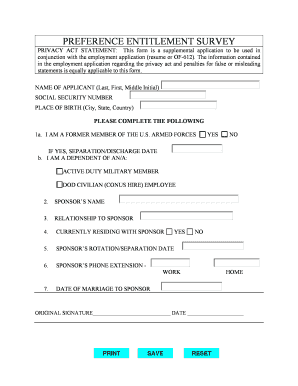
DOD Military Spouse Preference Registration 2013-2026 free printable template
We are not affiliated with any brand or entity on this form

Fill out
Complete the form online in a simple drag-and-drop editor.

eSign
Add your legally binding signature or send the form for signing.

Share
Share the form via a link, letting anyone fill it out from any device.

Export
Download, print, email, or move the form to your cloud storage.
Why pdfFiller is the best tool for your documents and forms


End-to-end document management
From editing and signing to collaboration and tracking, pdfFiller has everything you need to get your documents done quickly and efficiently.
Accessible from anywhere
pdfFiller is fully cloud-based. This means you can edit, sign, and share documents from anywhere using your computer, smartphone, or tablet.
Secure and compliant
pdfFiller lets you securely manage documents following global laws like ESIGN, CCPA, and GDPR. It's also HIPAA and SOC 2 compliant.
What is DOD Military Spouse Preference Registration
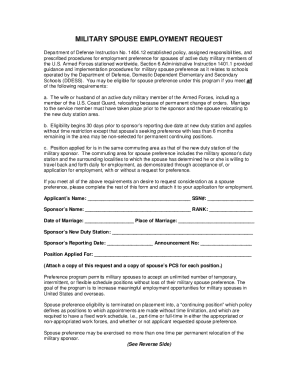
The Military Spouse Preference Registration Form is a government document used by the spouses of active duty military members to register for preference in non-appropriated fund (NAF) positions.
pdfFiller scores top ratings on review platforms




Is really easy to find a templete to fill out, I enjoy it
I wanted software for fill in forms and this did what I was needing.
Who needs DOD Military Spouse Preference Registration?
Explore how professionals across industries use pdfFiller.

DOD Military Spouse Preference Registration is needed by:
-
Spouses of active duty military members seeking employment
-
Human Resources personnel in military installations
-
Deputy Directors of Human Resources overseeing NAF positions
-
Military family support organizations providing guidance
-
Recruitment officers in military/service branches
Comprehensive Guide to DOD Military Spouse Preference Registration
What is the Military Spouse Preference Registration Form?
The Military Spouse Preference Registration Form is a crucial document designed for spouses of active duty military members seeking employment in non-appropriated fund (NAF) positions. This form enables military spouses to gain preference in securing job opportunities, thus enhancing their employment prospects amidst frequent relocations.
Qualifying individuals include those legally married to active duty military personnel. Understanding the form's definition and intended use is essential for eligible military spouses aiming to improve their job search outcomes.
Purpose and Benefits of the Military Spouse Preference Registration Form
The primary purpose of the Military Spouse Preference Registration Form is to provide military spouses with a competitive edge in job applications for NAF positions. By registering for military spouse preference, individuals can access numerous advantages that significantly impact their employment opportunities.
-
Enhanced job opportunities within NAF positions.
-
Faster hiring processes as a preferred candidate.
-
Improved networking and community connections.
Timely registration is paramount for maximizing these benefits and ensuring military spouses are well-positioned for employment within their communities.
Eligibility Criteria for the Military Spouse Preference Registration Form
To complete the Military Spouse Preference Registration Form, specific eligibility criteria must be met. Eligible military sponsors include active duty members and their spouses who are legally married and maintain a valid marital status.
-
Military sponsors must have a valid military identification.
-
Spouses must apply for preference within specific timeframes post-activation.
-
Restrictions may apply based on the type of position sought.
Understanding these criteria is vital, as ineligibility may impede access to valuable employment opportunities.
How to Fill Out the Military Spouse Preference Registration Form Online (Step-by-Step)
Filling out the Military Spouse Preference Registration Form online can be straightforward with proper guidance. Follow these steps to ensure accurate completion using pdfFiller:
-
Gather required personal information, including your military sponsor's details.
-
Access the form through pdfFiller and enter all necessary information.
-
Review the information for accuracy before finalizing.
-
Sign the form digitally, ensuring it is validated by the Deputy Director of Human Resources.
These steps are designed to facilitate a smooth application process and minimize common mistakes that can delay submission.
Reviewing and Validating Your Completion of the Form
After completing the Military Spouse Preference Registration Form, thorough review and validation are vital. Ensuring that all fields are filled correctly will prevent complications in the application process.
-
Check for missing fields or incorrect information.
-
Common errors include typos in identification details and military sponsor information.
-
Double-check your signatures and any required verification.
Careful validation helps maintain the integrity of your application and enhances the likelihood of swift processing.
Submission Methods for the Military Spouse Preference Registration Form
Submitting the completed Military Spouse Preference Registration Form can be done through various methods, each with its own advantages. Users can choose to submit the form online using pdfFiller or via traditional mail.
-
Online submission allows for tracking and immediate confirmation.
-
Mail submissions require careful attention to delivery timelines.
-
Adhere to submission deadlines to avoid delays.
Confirmation steps post-submission are critical to ensure that your application is received and processed correctly.
What Happens After You Submit the Military Spouse Preference Registration Form?
Once you submit the Military Spouse Preference Registration Form, understanding the next steps in the process is essential. Applicants can expect specific timelines for confirmation and processing of their forms.
-
Typically, applicants will receive a confirmation notification shortly after submission.
-
Tracking your application status can be accomplished through the designated channels.
-
In case of required changes post-submission, be sure to follow designated protocols.
Being informed of these procedures will help military spouses navigate their employment journey effectively.
Security and Compliance Overview for the Military Spouse Preference Registration Form
Handling the Military Spouse Preference Registration Form necessitates stringent security measures to protect sensitive information. pdfFiller employs advanced security protocols, including 256-bit encryption, to safeguard users' data.
-
The platform adheres to compliance regulations such as HIPAA and GDPR.
-
Users can be assured of their privacy throughout the submission process.
-
Audit trails for submitted forms help maintain accountability.
Familiarity with these security measures provides peace of mind for military spouses who are submitting sensitive information.
Utilizing pdfFiller to Effortlessly Complete Your Military Spouse Preference Registration Form
pdfFiller offers a robust platform that simplifies the completion of the Military Spouse Preference Registration Form. Users can take advantage of features such as eSignature, editing tools, and easy document management.
-
Leveraging cloud-based capabilities streamlines the submission process.
-
Efficient document handling helps in maintaining organized records.
By utilizing pdfFiller's tools, military spouses can enhance their form completion experience and ensure a smoother application process.
How to fill out the DOD Military Spouse Preference Registration
-
1.To access the Military Spouse Preference Registration Form on pdfFiller, visit the website and use the search bar to find the form by name.
-
2.Once located, click on the form to open it in the pdfFiller editor, where you will see all fillable fields and checkboxes clearly displayed.
-
3.Before you start filling out the form, gather all necessary information about yourself and your military sponsor, including personal details and service information.
-
4.Carefully fill out each section, ensuring that you enter accurate information, especially in critical fields like personal identification and contact details.
-
5.Utilize pdfFiller's features to add checkmarks or fillable entries where necessary, and refer to the provided instructions to navigate through each part.
-
6.After completing the form, review all entries to confirm they are accurate and up-to-date. Utilize the preview feature to ensure proper formatting.
-
7.When satisfied with your entries, save your completed form to your pdfFiller account, or download it as a PDF to your device.
-
8.If required, you can submit it directly through pdfFiller or print it out for manual submission, depending on your intended pathway.

Who is eligible to use the Military Spouse Preference Registration Form?
The Military Spouse Preference Registration Form is specifically for spouses of active duty military members seeking NAF employment. Ensure that you meet this eligibility criterion before filling out the form.
What information do I need to provide when filling out the form?
You'll need personal information, your military sponsor's details, and any proof of status to complete the form accurately. Ensure all data is correct and verifiable.
Can I submit the form electronically through pdfFiller?
Yes, you can complete and submit the Military Spouse Preference Registration Form electronically through pdfFiller. Just ensure you choose the correct submission option to comply with requirements.
What are some common mistakes to avoid when filling out this form?
Common mistakes include not signing the form, providing incorrect personal details, or failing to include necessary documents. Double-check all entries for accuracy before submission.
Is there a deadline for submitting the military spouse preference form?
While specific deadlines can vary, it is advisable to submit the form as soon as possible to ensure your preference is considered. Check with your local Human Resources for any specific timeframes.
What happens after I submit the form?
After submission, your application will undergo processing. You may receive notifications or additional instructions from your Human Resources office regarding your preference status.
Are there fees associated with the Military Spouse Preference Registration Form?
Typically, there are no fees for submitting the Military Spouse Preference Registration Form. However, check for any potential fees associated with job applications in the NAF system.
Related Forms




Related Catalogs
Get the latest insights from our blog



If you believe that this page should be taken down, please follow our DMCA take down process
here
.
This form may include fields for payment information. Data entered in these fields is not covered by PCI DSS compliance.